
Home » Download

MOSTPLAY App Download for Android and iOS: Install Guide and Features
MOSTPLAY app download gives you quicker access, lighter data use, and smooth play on your phone. Install the app to get faster login, live cricket updates, and push alerts for matches and offers without keeping a browser tab open.
Registration and account checks are built for mobile users. Expect simple phone verification, fast support replies, and name-matching on payment accounts for smoother withdrawals. The app keeps your session stable, even on spotty data connections.
Why the MOSTPLAY mobile app is better than the browser on your phone
The app is tuned for touch, speed, and quick access so you can act in seconds. It reduces page reloads and keeps you logged in securely while you switch between matches and games.
Faster loads with lower data use
Core pages cache on-device, so common actions load quickly even on average connections. You use less data across a full session.
Live cricket focus with in-play stability
Track MOSTPLAY cricket markets with steady in-play performance and clearer score updates. Switch between odds and stats without losing your place.
One-tap login and biometric security
Enable fingerprint or Face ID for instant access. MOSTPLAY login becomes a single tap while device-level security protects your account.
Smart notifications you can control
Opt in to score alerts, price movements, and time-limited offers. Choose the teams and events you care about and mute the rest.
Smoother JILI slots and arcade-style gameplay
JILI titles load faster in the app and resume where you left off. Animations feel fluid and responsive on most modern devices.
Local-friendly payments and responsive support
Deposit and withdraw with trusted local payment choices and familiar wallet methods. In-app chat replies are fast, with clear guidance when you need ID verification.
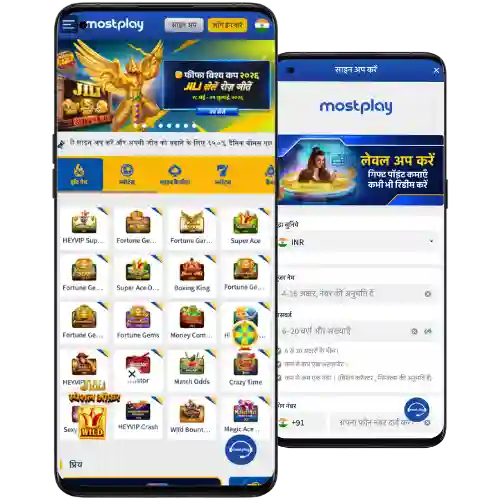
Step-by-step instructions to download, install, and update the MOSTPLAY mobile app
- Open your mobile browser and visit the MOSTPLAY official site on your device.
- Find the App section on the homepage and tap the download button.
- Choose your platform: Android or iOS, then follow the on-screen prompts.
- Android: Confirm the MOSTPLAY apk download, then open the file to begin install.
- If prompted, allow your browser or file manager to install from this source.
- iOS: If a native app is available in your region, follow the link; otherwise, select Add to Home Screen from Safari for an app-like icon.
- Open the app, accept only necessary permissions, and install MOSTPLAY app updates when offered.
- Log in or create your account, then complete quick verification for smoother future withdrawals.
- Enable notifications for match alerts, offer reminders, and maintenance updates.
Core app features built for lighter data use, faster play, and clearer navigation
Fast start with one-tap MOSTPLAY login
Save your device and enable biometrics for quick, secure entry. No repeated form-filling on small screens.
Live cricket odds, scores, and timely alerts
Follow toss updates, price moves, and innings milestones. Set alerts for your favorite teams and series.
JILI slots and arcade titles that feel smooth
Enjoy cleaner graphics and quick re-entry to your last round. The app keeps pace even when reception dips.
Cleaner menus and bottom-tab navigation
Key actions sit within thumb reach. Switching between sports, casino, and support takes fewer taps.
Notifications that respect your choices
Control which offers, matches, and results you hear about. Mute or unmute categories anytime in Settings.
Security layered for real-world use
Device binding, optional PIN, and biometric checks reduce account risks. Name and account matching help protect withdrawals.
Exclusive in-app promotions, event alerts, and helpful reminders you actually want
Turn on notifications to hear about early-bird reloads, selected free spins, and match-day boosts. Many offers are time-sensitive, so alerts help you act while they’re live.
Check the Offers tab for the latest MOSTPLAY bonus updates and event-led deals. For a quick route to current campaigns, see MOSTPLAY Promotions in the app menu.
MOSTPLAY app download FAQs for Android, iOS, updates, storage, and safety
Is the MOSTPLAY app free to download and use on mobile?
Yes. Downloading the app is free, and you only use data from your mobile plan. Standard network charges apply from your provider.
How do I install the MOSTPLAY apk on my Android phone?
Tap Download on the site, open the apk, and confirm install. If asked, allow installs from this source in your browser or file manager settings, then reopen the installer.
Can I get the app on iPhone or should I use the browser?
Tap the iOS button to check regional availability. If a native app is not offered, choose Add to Home Screen from Safari for app-like access with notifications supported via the browser.
Why does the app request certain permissions during installation?
Permissions support features like notifications and storage for faster loading. You can deny non-essential permissions and still access core functions.
How do I update the app and keep storage under control?
Open the App section to install updates or enable auto-update if shown. Updates are incremental, and you can clear cache in Settings to free space without losing your account data.
Start using the MOSTPLAY app today with easy install and reliable support
Get the MOSTPLAY app download and move from browser taps to faster, focused play. Keep cricket odds, JILI games, and notifications one tap away, with support ready when you need help.
Create your account in minutes and verify once for smoother withdrawals later. If you are new, tap MOSTPLAY Register after install to complete setup and start exploring features right away.